
Kansas City Star | Local News
McClatchyNews & Magazines
2.8330.00 Reviews
- Version
- 11.1.16
- Installs
- 50.00K
- Age Rating
- Everyone 10+
Screenshots






Our Review of Kansas City Star | Local News
 Analysis by Appyee
When I want a quick sense of what is happening around Kansas City, a local news app has a different job from a national headline feed: it should help me connect the day’s stories to the place where I live, work, or visit. Kansas City Star News is built around that local focus, bringing news, weather, sports, and other coverage for the Kansas City metro area into one app. I see its strongest case not as replacing every news source I use, but as giving local developments a more prominent place in my daily routine.
A local lens, not another general news feed
The central appeal is the concentration on the Kansas City area. National news apps can be useful for major events, but local decisions, neighborhood concerns, regional weather, and teams often get less attention there. This app is aimed at readers who want to check what is happening close to home without first sorting through a broad stream of unrelated headlines. That focus is useful even when I only have a few minutes: it gives me a reason to open a news app for local context rather than simply scan the same national stories I have already seen elsewhere.
That distinction also sets a realistic expectation. A metro-focused source is most valuable when the story depends on local reporting or affects people in the area. For breaking national events or a wide range of viewpoints from across the country, I would still turn to other publications. I treat the local app as a complement, not as my only window on the news.
First Impressions and Usability
From the moment I launched the app, I was greeted with a sleek, user-friendly interface. It's one of those apps where you don't need a manual to find your way around. Everything is laid out intuitively, which, let's be honest, is a godsend in the world of app overload.
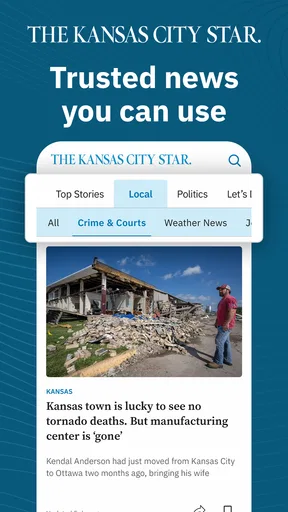
The home screen is packed with current headlines that are updated constantly, so you're always in the loop. Whether it's breaking news, sports updates, or weather forecasts, Kansas City Star News delivers it all right to your fingertips. The navigation bar at the bottom makes it super easy to switch between sections, and I found myself seamlessly moving from one category to another without a hitch.
Making a short check-in useful
For me, the practical test of a local news app is whether it fits into ordinary gaps in the day. A reader might open it over breakfast to see whether the weather could affect a commute, then return later to check a local development or a game result. Keeping those subjects together makes that routine simpler than visiting separate weather, sports, and newspaper apps, particularly if the goal is a quick overview rather than a deep research session.
There is a useful habit here: start with the local headlines, then choose one story that has a direct bearing on your plans or interests. That keeps a brief visit from turning into aimless scrolling. If a story is important but you are heading out the door, the article-saving option described below offers a way to return when you have time. I would still check the details of an urgent weather warning or breaking event through the relevant official source when decisions depend on precise, current instructions; a news article is context, not a substitute for emergency guidance.
Content Quality and Depth
Now, let's talk about the content itself. What really impressed me was the depth and quality of the articles. You can tell the writers know their stuff, providing in-depth analysis and insights on local events, politics, and culture. It's like having a personal tour guide to Kansas City, except in digital form.
I especially enjoyed the sports section. It’s perfect for catching up on the latest Kansas City Chiefs games or Royals matches. The level of detail in the game analyses and player profiles is just what any sports nut would crave. And for those of you who love a good human interest story, there's no shortage of those either. The app does a brilliant job of balancing hard news with lighter, feel-good pieces.
Choosing it over broader alternatives
Compared with a general news aggregator, the value here is the local emphasis: I do not have to rely on a national feed happening to surface a Kansas City story. Compared with going directly to a newspaper website, an app can be more convenient for repeated check-ins, especially when I want news and sports in the same place. The trade-off is that a locally focused publication will not offer the breadth of a large multi-outlet aggregator. Readers who want many publishers, extensive national coverage, or a single feed tailored across several cities may be better served by those alternatives.
It is also worth separating convenience from access. The app is free to download, but it includes in-app purchases priced from around eight dollars to around one hundred sixty dollars per item. That range makes it sensible to check the terms shown in the app before committing to anything, especially if you only want occasional headlines. If you are mainly looking for a free, broad overview, compare what you can read in the app with your needs before deciding whether a purchase makes sense for you.
Customization and Notifications
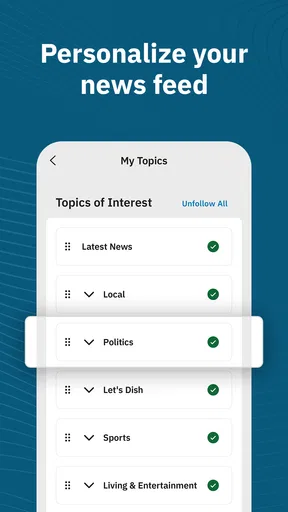
One of the standout features for me is the customization options. You can tailor the content to suit your interests, which is a great way to filter out the noise and focus on what truly matters to you. Plus, the notifications are spot on. You won’t find yourself bombarded with alerts, but rather timely, relevant updates that keep you informed without being intrusive.
The app also provides options to save articles for later. This is perfect for those moments when you stumble upon an interesting piece but don’t have the time to read it right away. Just bookmark it, and you can dive back in whenever you have a spare moment.
A more deliberate reading routine
Saved articles are most helpful when I use them as a small reading queue rather than a permanent archive. For example, I can save a local policy story during a busy afternoon, then read it later when I can give the details proper attention. That is a practical advantage over a feed that disappears as newer items push older ones down. It also helps keep casual reading separate from stories I genuinely want to understand.
Notifications work best when they support that routine instead of interrupting it. I would keep alerts focused on developments I care about and use the app itself for a fuller catch-up. Anyone who prefers a completely quiet phone can still open the app when convenient, while readers who rely on alerts should review their choices so local updates remain useful rather than becoming background noise.
Visuals and Multimedia
Visually, the app is a treat. The articles are accompanied by high-quality images and videos, making the reading experience more engaging. I found that the multimedia content really adds another layer of understanding to the stories. It's one thing to read about a local festival, but seeing vibrant photos and videos of the event brings it to life in a way words alone can't.
Who will get the most from it
I would recommend it most to people who live in the Kansas City metro area, follow local sports, or want a regular source of regional reporting alongside their other news. It can also suit someone who has moved away but still cares about the city and wants an easy way to keep up with its coverage. The app’s Everyone 10+ content rating makes it broadly suitable for family devices, though parents should still use their own judgment about which stories are appropriate for a particular child.
On the other hand, it is not the right pick for someone who wants only national or international coverage, needs a multi-city local feed, or expects every article to be available without considering the in-app purchase options. The average rating is 1.8 from around 760 ratings, so I would not assume the experience will suit everyone. A low average does not explain any individual reader’s experience, but it is a fair reason to try the app cautiously and see whether its local coverage and day-to-day usability work for you.
Device details and practical expectations
The app is published by McClatchy and is listed as a News & Magazines app. It first appeared on December 27, 2011, and its current version is 11.1.2, with Android 8.0 as the minimum operating system requirement. It has more than 50,000 installs. Those details suggest an established local publication app, but they do not guarantee that every device will feel equally smooth; if you are using an older phone, checking compatibility before installing is a sensible first step.
A common question is whether it is free: the app itself costs nothing to install, while optional in-app purchases are available. Another is whether it is useful outside the metro area. It can still help readers who follow Kansas City from elsewhere, but its strongest relevance is naturally for people whose interests are tied to the region. And if all you need is a one-off weather check, a dedicated weather service may be faster; the appeal here is having weather alongside local reporting and sports rather than treating it as a standalone tool.
Wrapping It Up
In conclusion, Kansas City Star News is a must-have for anyone living in or interested in Kansas City. It's not just an app; it's a gateway to the heart of the city, offering a comprehensive look at everything that's happening around town. From its user-friendly design to the rich, engaging content, it’s clear that a lot of thought and effort has gone into creating an app that truly serves its community.
So, if you're looking to stay connected with the pulse of Kansas City, give Kansas City Star News a try. It's like having the city right in your pocket, ready to inform and entertain at a moment's notice. Happy reading!
Verdict
Strengths of Kansas City Star | Local News
- Comprehensive local news coverage.
- User-friendly and intuitive interface.
- Customizable news alerts.
- Offline reading mode available.
- Regularly updated content.
Limitations of Kansas City Star | Local News
- Limited customization options.
- Occasional app crashes reported.
- Requires subscription for full access.
- Ads can be intrusive at times.
- Slow loading of some articles.
Other Releases by McClatchy
View All
Fort Worth Star-Telegram News
News & Magazines3.0

The Charlotte Observer | News
News & Magazines2.7

Sacramento Bee News California
News & Magazines3.1

Miami Herald Latest Local News
News & Magazines3.9
Similar Picks in This Category
View All
Google News - Daily Headlines
Google LLC4.0

X
X Corp.4.8

Flipboard:Your Social Magazine
Flipboard3.4

Opera News: breaking & local
Opera4.5

Hindi News by Dainik Bhaskar
Dainik Bhaskar Group4.0

Way2News Daily News App
Way2News ( Formerly Way2SMS )4.6
Frequently Asked Questions
What features does the Kansas City Star News app offer?
The Kansas City Star News app provides users with access to the latest breaking news, in-depth local reporting, and real-time updates. It includes personalized news alerts, a user-friendly interface for browsing articles, and the ability to save stories for offline reading. Video content and opinion pieces are also available.
Is the Kansas City Star News app free to use?
The app can be downloaded for free, but it offers both free and premium content. To access exclusive articles, in-depth analysis, and ad-free browsing, a subscription is required. Subscription plans can vary, offering different rates and durations to suit various user preferences.
Can I customize the news alerts in the Kansas City Star News app?
Yes, the app allows users to customize their news alerts to receive updates on topics of interest. You can adjust the settings to get notifications on breaking news, specific categories, or local updates. This ensures you stay informed about what matters most to you without being overwhelmed by notifications.
Is the Kansas City Star News app available on both Android and iOS?
Yes, the Kansas City Star News app is available for download on both Android and iOS platforms. Users can find it in the Google Play Store for Android devices and the Apple App Store for iOS devices. It is designed to offer a seamless experience across different devices.
How does the Kansas City Star News app ensure up-to-date information?
The app is integrated with a robust content management system that allows for real-time updates. Journalists and editors work around the clock to provide the latest news and insights, ensuring users have access to timely and accurate information. Push notifications also help keep you informed as news breaks.
